
Screenplay Format Template
Screenplays follow a strict format so that one page lasts about a minute of screen time. Type your script in simple plain text — scene headings in capitals, character names above their lines — and this template lays it out with standard margins, spacing and 12-point Courier, counts your pages and estimated running time, and prints to a clean PDF.
- Free to use
- No sign-up
- Runs in your browser
Screenplay formatter
Screenwriting Template Pack
Screenwriting templates: a formatted screenplay template (Word) with styles for each element, a title page template, a beat sheet, a scene outline workbook and a formatting cheat sheet.
- Screenplay template (DOCX)
- Title page (DOCX)
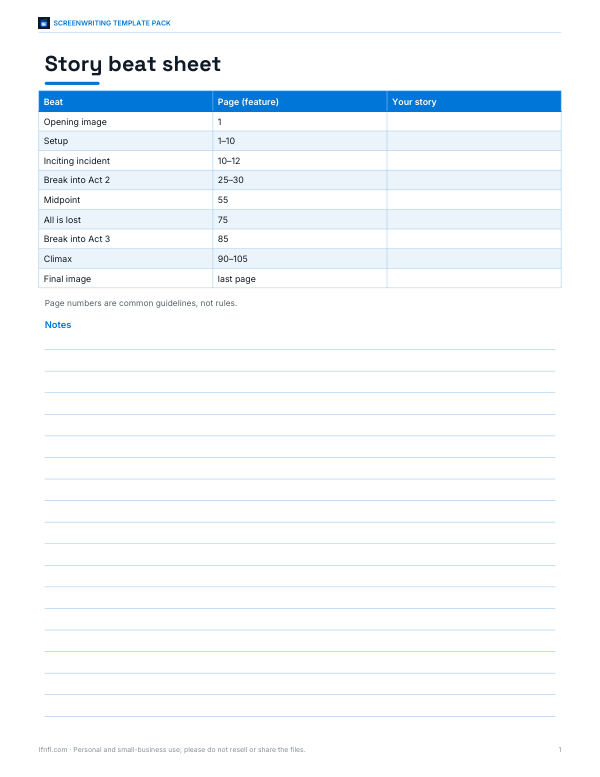
- Beat sheet (PDF/DOCX)
- Scene outline (XLSX)
- Cheat sheet (PDF)
Formats: DOCX, PDF, XLSX. Instant download after payment (link valid 72 hours, up to 5 downloads). AI-assisted: the templates were drafted with AI help and reviewed and laid out before publishing.
$3.00 USD, one-time 5 files · about $0.60 each
- Instant download
- 7-day refund
- Secure checkout by Stripe
7-day money-back guarantee. Full refund within 7 days of purchase, even after you download.
Free sample: Beat Sheet (PDF, 56 KB)
Full refund within 7 days — see the refund policy and license.
Free printables
Single sheets you can print right now, no sign-up. The full pack adds every sheet in one download plus the editable files.
 Printable Scene Outline Template
 Screenplay Format Cheat Sheet
Standard screenplay format
| Element | Position (from left edge of page) | Style |
|---|---|---|
| Scene heading (slugline) | 1.5″ | ALL CAPS: INT./EXT. LOCATION - TIME |
| Action | 1.5″ to 7.5″ | Present tense, sentence case |
| Character name | about 3.7″ | ALL CAPS |
| Parenthetical | about 3.1″ | (lower case, brief) |
| Dialogue | about 2.5″ to 6″ | Sentence case |
| Transition | right-aligned | ALL CAPS, ending in TO: |
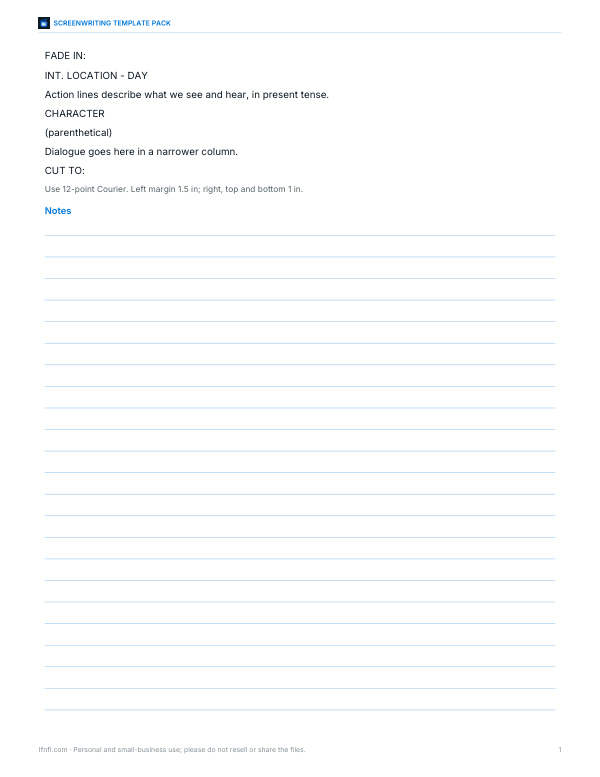
Pages use 12-point Courier on US Letter paper, with a 1.5-inch left margin for binding and about 1-inch margins elsewhere. This consistent format is why one page averages about one minute of screen time.
How to write in the formatter
- Start scenes with a scene heading: INT. for interior, EXT. for exterior, then the location and time of day — INT. KITCHEN - NIGHT.
- Write action in present tense, describing only what we see and hear.
- Put a character’s name in capitals on its own line, after a blank line, with their dialogue on the next lines.
- Add a parenthetical in (brackets) under the name for a brief delivery note.
- Write transitions like CUT TO: in capitals on their own line.
- Leave a blank line between elements. The formatter lays everything out automatically.
This simple plain-text style is compatible with Fountain, an open screenwriting markup, so you can download the text and continue in screenwriting software that supports it.
Scene headings
| Heading | Meaning |
|---|---|
| INT. | Interior — inside a location |
| EXT. | Exterior — outside |
| INT./EXT. | Moves between inside and outside, or both (e.g. a car) |
| DAY / NIGHT | Keep time of day simple |
| CONTINUOUS | Action flows directly from the previous scene |
| LATER / MOMENTS LATER | Short time jump in the same place |
Common formatting mistakes
- Camera directions (“we see”, “close on”) — leave shots to the director unless essential.
- Long action paragraphs — keep them to three or four lines.
- Overusing parentheticals to direct actors.
- Introducing characters without capitalising their name on first appearance.
- Writing unfilmable thoughts or backstory in action lines.
- Using fonts other than Courier or changing margins to cheat page count.
Worked example
The sample opens with FADE IN:, then the scene heading EXT. HARBOUR - NIGHT, a short action paragraph introducing MAYA (30s) in capitals, and an exchange with the DECKHAND. The formatter places the scene heading and action at the left margin, the character names at about 3.7 inches, Maya’s “(breathless)” parenthetical at 3.1 inches and the dialogue in a narrower column, and right-aligns CUT TO:. It estimates about one page — roughly a minute of screen time.
Page count and length
| Format | Typical length |
|---|---|
| Feature film | 90–120 pages |
| One-hour TV drama | 50–65 pages |
| Half-hour comedy (single camera) | 25–35 pages |
| Short film | 5–15 pages |
Page counts are estimates — dialogue-heavy scenes play faster and action scenes slower than a minute per page.
Dialogue tips
- Keep speeches short — most lines are one to three sentences.
- Let characters talk past each other; real people rarely answer directly.
- Avoid “on the nose” dialogue that states feelings outright.
- Read scenes aloud to hear rhythm and catch awkward lines.
- Use (beat) sparingly for pauses; let action lines show reactions.
Action lines that read fast
Readers skim action, so write it in short paragraphs of three or four lines, in the present tense, focusing on what the audience sees and hears. Capitalise a character’s name the first time they appear, along with their age — MAYA (30s) — and keep camera language to a minimum. White space on the page keeps the read moving and helps producers picture the pace of the film.
TV scripts
Television scripts follow the same basic format with a few differences: one-hour dramas are usually divided into acts with headings like ACT ONE, and multi-camera sitcoms use a distinct format with dialogue in double spacing and action in capitals. Always check the format used by the show or competition you’re writing for.
Title page
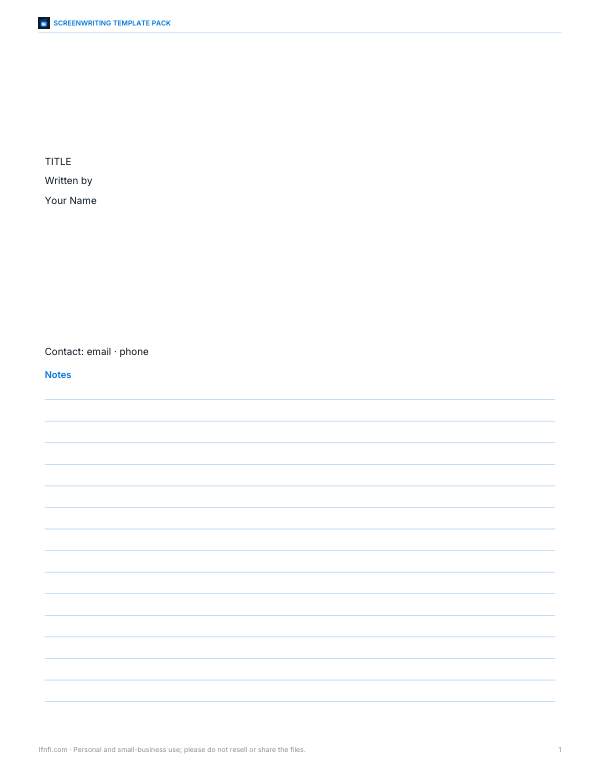
A standard title page shows the title in capitals centred about a third of the way down, “Written by” and the writer’s name below it, and contact details in the lower left corner. Leave out dates, draft numbers and copyright notices on spec scripts sent to competitions or readers unless they ask for them.
Privacy
Your script stays in your browser. Nothing is uploaded, so you can work on unpublished material safely — but save a copy, as the text isn’t stored when you close the page.
Frequently asked questions
What font is used for screenplays?
12-point Courier (or Courier New / Courier Prime).
What are the margins in a screenplay?
About 1.5 inches on the left and 1 inch on the right, top and bottom.
How long is one screenplay page?
About one minute of screen time.
What does INT. and EXT. mean?
Interior and exterior — where the scene takes place.
Can I export my script?
Print to PDF, or download the plain text in Fountain-compatible format.
What software do screenwriters use?
Dedicated screenwriting programs are common; many read the Fountain plain-text format this tool downloads.
Do I number scenes?
Not in a spec script; scene numbers are added later for production.
How long should action paragraphs be?
Usually no more than three or four lines.
Should I use bold or underline for scene headings?
Plain capitals are standard; some writers bold them, which is acceptable.
What does CONTINUOUS mean?
The new scene follows on directly with no time jump.
Is my script uploaded?
No, it stays on your device.